Let's talk
Back to articles
Security cameras5 min read

Choosing Security Cameras for Your Home or Business: Start With What You Need to See

A practical guide to coverage, lenses, night lighting and recording, with the questions to ask before approving an installation.
Security cameras

Give every camera a clear purpose

Before choosing a model, write down what you would want to know after an incident: who came through the gate, what happened beside the till, or whether someone approached the garden. Getting an overview and identifying a face at an entrance are different tasks. Mark entrances, routes and priority areas on a simple plan, along with the distance at which you need useful detail.

At home, consider everyday uses too, such as checking a delivery or a vehicle arriving. In a business, decide who will search recordings and at what times. Ask the installer to explain which camera serves each purpose and to identify any areas that will remain outside its coverage.

Choose coverage and lenses before chasing megapixels

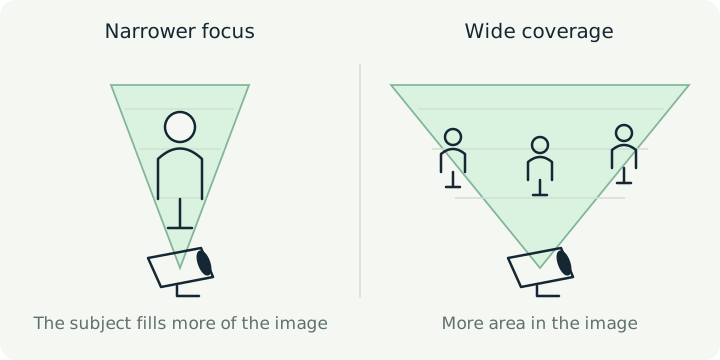
The megapixel count describes image resolution, but it does not guarantee that the detail you need will be clear. A wide view shows more space; when a person occupies only a small part of that image, fewer details are available about them. Focal length and sensor size affect the field of view, so the lens should match the distance and the task.

For example, a broad view of a car park may explain how an incident unfolded, while a defined entrance may justify an additional camera aimed at that route. Ask for a demonstration at the point of interest and the planned mounting height. Check a person walking through the scene, rather than an empty view. An adjustable lens can help frame the scene, but it still needs planning.

Test difficult lighting, not just midday

A dark entrance facing a bright street creates differences in brightness that challenge a camera. WDR can help in these situations. At night, long exposures can blur a moving person, and infrared light reflected from nearby surfaces can interfere with the image. Check the location at the times when the system will actually need to work.

Ask for an evening recording with someone following the usual route. Is the important detail still clear? Will the existing lights stay on after closing? Agree in advance whether additional lighting is needed, and consider its effect on household members and the surrounding area.

Separate cabling, power and recording

In a compatible system, PoE carries power and data over the same network cable. It is not another name for internet access and does not determine where video is stored. An NVR is a recorder for network cameras; storage may be in the recorder, in a supported camera or in another service, depending on the design.

Ask for details of cable routes, equipment locations and maintenance access. Find out which components will have backup power and what happens during an outage. If you expect to expand, discuss it when reviewing the proposal, before the cabling work is finished.

Plan how long recordings should be kept

Choose a retention period that reflects how long it may take you to discover an incident. Storage capacity alone does not tell you how many days you will get: bitrate, camera count and recording hours affect the result. Request an estimate based on the proposed settings and confirm whether recording is continuous or triggered by events.

At handover, ask to find and export a clip yourself. Make sure you understand how a storage fault is reported, what happens when storage fills up, and how to save a separate copy of an important incident before it is overwritten.

Understand what depends on the internet

A properly connected and configured local NVR system can continue recording without internet access. Remote viewing and cloud services may be affected by a connection failure. The local network cable and the internet connection have different roles; ask for a practical disconnection test suited to the equipment selected.

Clarify who controls the administrator account, who may view footage and who handles updates. Finish the installation with access details and clear guidance suited to the people who will actually use the system.

Choose a proposal you can assess

Compare proposals by the intended result in each area, as well as the number of cameras. Ask for model numbers, the purpose of every camera position, storage assumptions, training and written service terms. A professional consultation with EYETEC begins with your needs and site conditions, helping you understand what fits, what needs testing and the solution’s limitations before you decide.

Agree in advance how you will confirm that the work is complete: review camera positions together, watch recorded footage, check the date and time, and practise searching. If a result is unclear on site, ask about the options and the implications of changing the position, lens or lighting before adding equipment.

What should you prepare before speaking with an installer?

  • What needs to be visible at each position, and at what distance?
  • Has recorded footage with movement been checked at night too?
  • Where is video stored, and for how long with the proposed settings?
  • What keeps working during an internet or power outage?
  • Have we received access, training, an equipment list and service terms?

Technical sources

  1. Lenses in surveillanceAxis Communications
  2. Troubleshooting guide for image qualityAxis Communications
  3. Axis High Power over Ethernet midspans — datasheetAxis Communications
  4. Edge storageAxis Communications
  5. Network Video Recorders — local recording without internet FAQHikvision

This article explains general planning principles. Equipment, compatibility and installation are assessed for the specific models, infrastructure and site conditions.

Let’s discuss your solution

Privacy policy

Updated: November 1, 2026. For information and privacy inquiries about the EYETEC website: Yaniv Algali, info@eyetec.co.il, 052-363-7066.

Contacting us through the website

Providing your details is optional and helps us handle your inquiry and prepare a response or quote. You are not required to submit the form; you can contact us by phone or email. We need a way to contact you if you would like a reply.

The name, town or city, and text entered in the form remain on the page in your browser until you choose to continue to WhatsApp. Opening the link transfers the message content to WhatsApp as part of the URL. The message reaches the business only after you send it in WhatsApp. The form itself does not store your details in the website's database. Please do not enter sensitive information that is not needed for your inquiry.

Inquiries sent to the business through WhatsApp or email are used to handle the inquiry and provide service; they are also subject to the communication services you choose to use. You can use the contact details above to request access to information about you and correction of information that is inaccurate, incomplete, unclear or out of date, as provided by law.

Usage measurement — your choice

The website's own measurement starts only after consent. It includes random identifiers, active time, sections and guides opened, scroll depth, device and browser type, country and referral source. Browser identifiers are stored as HMAC hashes. Measurement does not copy form fields or message content. IP addresses are not stored in the website's measurement database. Reports are restricted to the website owner.

The site owner can view visit details, sections and guides opened, active time and traffic sources by anonymous browser identifier. This view does not identify visitors by name or display form contents.

The website uses localStorage and sessionStorage, not only cookies: your choice remains in the browser until you change it or clear storage; the measurement identifier is renewed after 90 days, and the session identifier after 30 minutes of inactivity or a change of day. Tab data lasts for its session. A cleanup process removes measurement data older than 90 days during visits with measurement enabled; the actual deletion time depends on when cleanup runs.

Declining does not prevent you from browsing or contacting the business. You can change your choice through “Cookie settings” in the footer. Withdrawing consent stops future measurement and removes measurement identifiers in this browser; it does not automatically delete information already sent. Requests already transmitted cannot be recalled. GPC and Do Not Track settings are supported and respected.

Infrastructure and external links

Website files, images and fonts are loaded from this site. We have not added advertising or marketing tracking tools. Sites hosting infrastructure and network services may process access, security and operational data or use their own storage; the website's measurement choice does not manage these services or guarantee that no technical information is processed. External links, WhatsApp and email services are also subject to their providers' policies.

If you select display adjustments using the accessibility button, we store your chosen text size, display options and button position in your browser. These preferences are used only for display and contain no visitor identifier. Resetting accessibility settings removes them and restores the button’s original position.

Accessibility statement

Last updated: November 1, 2026

At EYETEC, we work to improve access to information and services on this website. Our accessibility work refers to the principles of Israeli Standard 5568 at level AA. Testing and improvements are ongoing; this statement does not certify that a complete standards compliance assessment has been performed.

Website accessibility features

The on-screen accessibility button offers text enlargement up to 200%, high contrast, highlighted links and reduced motion. You can drag the button or choose its position from the menu. Adjustments can be combined or reset. Choices are saved in your browser for display purposes only, separately from consent to usage data collection. Browser zoom is also available.

Scope and limitations of testing

Code checks, partial automated checks, and keyboard and display checks in Chromium have been performed. Comprehensive manual screen reader testing, testing across all browsers and devices, and a full professional accessibility audit have not yet been completed. Further issues may exist; please report them so we can investigate and address them.

WhatsApp, email and external links lead to services we do not operate. If you cannot use one contact method, you can call or email us for information and to request an adjustment.

Accessibility inquiries

Accessibility contact: Yaniv Algali. Phone: 052-363-7066; email: info@eyetec.co.il.

Please include the page address, the action you tried to perform, a description of the difficulty, and your browser or assistive technology if known. You can also request information or service through an alternative method. You do not need to provide medical information to report a difficulty.

EYETEC · Easier to browse

Accessibility options

Choose the display that works for you. You can combine several adjustments.

Text size
100%

Enlarge text up to 200%. Browser zoom remains available.

Standard display is active.

You can also drag the accessibility button to a convenient place. Its position will be remembered for your next visit.

Adjustments are saved only in this browser and do not enable usage data collection. Use Tab to move between options, Enter or Space to activate them, and Escape to close.