Let's talk
Illustration of a modern home with an outdoor security camera at dusk
EYETEC · Smart Security and Communication Systems

Security you can see.
Peace of mind you can feel.

Your home, your business and the people who matter to you.
Bringing together smart technology, careful planning
and personal service — for your peace of mind.

From the first conversation, you have someone to turn to.
Technology in the background.
Life at the center.
Illustrative image
PROTECTION. CONNECTION. PEACE OF MIND.Confidence in every detail
Technology from leading brands

Choosing the equipment that suits you.

  • Provision-ISR
  • Hikvision
  • Dahua
  • Reolink
  • NETGEAR
  • RISCO
  • PIMA
  • CROW
  • Maximum
  • Visonic
  • Paradox
  • Control4
  • KNX
  • Yamaha
  • Denon
  • 2N
  • Akuvox
  • Pal Wintec
  • FERMAX
  • HP
  • HPE
  • Aruba
  • Ruijie
  • Ubiquiti
  • Hanwha Vision
  • Uniview
  • Axis
  • Bosch
  • Honeywell
  • Cisco
  • Ruckus
  • TP-Link Omada
  • Lutron
  • Crestron
  • Nice
  • Bticino
  • Comelit
  • Bowers & Wilkins
  • KEF
  • Sonance
  • FIBARO
  • Zigbee
  • Z-Wave

A selection of the brands and standards we work with. Equipment suitability and system integration are assessed for each project.

Technology moves forward.
Service stays personal.

✓ A solution built around your needs
✓ Clear explanations, without the complexity
✓ Installation, guidance and service
01 / Start with your needs

Not sure
what you need?
Let's make it clear.

Four short questions to help you understand what to check, which systems may be relevant and where to start.

About one minuteNo contact details required
Prefer to read first? Explore our expert guides
Question 1 of 4

What kind of property needs a solution?

Choose the option that fits best.

This is a starting point for a conversation. Planning and equipment are determined after assessing the property and your needs.

02 / Equipment and solutions

Professional systems.
A choice of leading brands.

Explore the equipment and the questions worth asking.
What does the system need to do? Under what conditions?
And how will it fit your existing infrastructure?

The images illustrate types of equipment from the brands we work with. The manufacturer, model and specification are chosen according to your needs and infrastructure.

SMART SURVEILLANCE

See what matters.

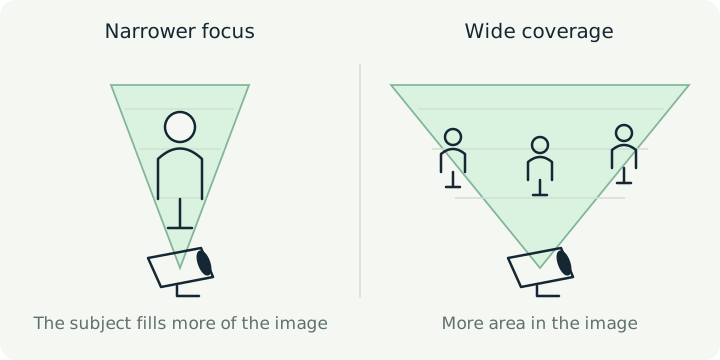
Security camera planning and installation based on the property and the areas that need coverage. We select positions, recording systems and viewing options that suit your needs.

Coverage planningRecording and viewingInstallation and setup
Brands and solutions we work with
Provision-ISR
Hikvision
Dahua
Reolink
Hanwha Vision
Uniview
Axis
Bosch
What should you know before choosing? Let's talk about security cameras

Service area · From Herzliya to Zikhron Ya’akov. Projects in Tel Aviv and Haifa are considered individually.

03 / Understand before you choose

What would you like to understand?

Choose a category, then the guide that interests you.
Explanations and illustrations to help you choose with confidence.

EYETEC insights

A professional view of your systems.

Practical explanations, useful questions and planning that starts with your needs.

All articles
04 / Our approach

Security starts
with how we work.

A good system is more than a list of equipment.
It begins with listening, continues with organized work
and ends with you knowing how to use it.

01

Understand first.

We learn about the property, your routine and your needs. We discuss your concerns and the result you want.

02

Plan and install.

We develop a clear solution and proposal, coordinate the work and connect the systems according to the agreed plan.

03

Test and explain.

We check the system, walk you through its use and remain your point of contact for service and maintenance.

05 / The people behind the system

Smart technology.
Personal accountability.

Yaniv AlgaliEYETEC · Security and Communication Systems

Understand what you are getting, feel comfortable with your system and know who to contact.

Hello, I'm Yaniv. At EYETEC, I connect security and communication systems with the needs of the people who use them. My approach is simple: listen, explain and work in an organized way.

Whether you need a new installation, an upgrade or help with a fault, we will start with a conversation and work out what is right for you.

Let's talk about your needs
06 / Good to know

Small questions.
More peace of mind.

Not sure where to start?
You can simply talk to us.

052-363-7066
Which systems does EYETEC plan and install?

We plan and install security cameras for homes and businesses, alarm systems and detectors, video intercoms and access control, data networks and Wi-Fi, home automation, smart homes, multimedia and home cinema systems. We also offer service, maintenance and upgrades to existing systems. Equipment is chosen according to your needs, infrastructure and compatibility between components.

I don't know which system I need. Where do I start?

Start with what matters to you: what you want to see, what you need to protect and how you use the property. Our first conversation explores your needs and the existing infrastructure, so we can assess a suitable solution.

Can an existing system be upgraded?

It is sometimes possible to reuse some existing equipment or infrastructure. We need to check models, physical condition and compatibility before recommending what to keep and what to replace.

Can I view the cameras on my phone?

Remote viewing can be configured on systems that support it. The options depend on the equipment, internet connection and security settings, and are checked as part of choosing your solution.

What should I know before requesting a quote?

Prepare a short description of the property, what you want the system to do, and any existing equipment or infrastructure. Photos of the area and equipment can help us understand the work and make the proposal more precise.

Is there someone to contact after installation?

You can contact EYETEC for service, faults and maintenance. The scope of service, warranty terms and any additional costs will be set out in the relevant proposal or agreement.

07 / It starts with a conversation

Something matters
enough to protect.
Let's talk.

Tell us what you need.
We'll clarify the options and work out the next step together.
Directly with Yaniv · No transfers between departments

What solution are you looking for?

Prepare a short message, then continue the conversation on WhatsApp.

Choose a category (you can select more than one)

Providing your details is optional and helps us handle your inquiry and prepare a response or quote. You can also contact us by phone or email; we need a way to contact you if you would like a reply. Clicking Continue transfers the message content to WhatsApp through the link; the message reaches the business only after you press Send there. For information inquiries: Yaniv Algali, info@eyetec.co.il, 052-363-7066. You may request access to and correction of information as provided by law.

Privacy policy

Updated: November 1, 2026. For information and privacy inquiries about the EYETEC website: Yaniv Algali, info@eyetec.co.il, 052-363-7066.

Contacting us through the website

Providing your details is optional and helps us handle your inquiry and prepare a response or quote. You are not required to submit the form; you can contact us by phone or email. We need a way to contact you if you would like a reply.

The name, town or city, and text entered in the form remain on the page in your browser until you choose to continue to WhatsApp. Opening the link transfers the message content to WhatsApp as part of the URL. The message reaches the business only after you send it in WhatsApp. The form itself does not store your details in the website's database. Please do not enter sensitive information that is not needed for your inquiry.

Inquiries sent to the business through WhatsApp or email are used to handle the inquiry and provide service; they are also subject to the communication services you choose to use. You can use the contact details above to request access to information about you and correction of information that is inaccurate, incomplete, unclear or out of date, as provided by law.

Usage measurement — your choice

The website's own measurement starts only after consent. It includes random identifiers, active time, sections and guides opened, scroll depth, device and browser type, country and referral source. Browser identifiers are stored as HMAC hashes. Measurement does not copy form fields or message content. IP addresses are not stored in the website's measurement database. Reports are restricted to the website owner.

The site owner can view visit details, sections and guides opened, active time and traffic sources by anonymous browser identifier. This view does not identify visitors by name or display form contents.

The website uses localStorage and sessionStorage, not only cookies: your choice remains in the browser until you change it or clear storage; the measurement identifier is renewed after 90 days, and the session identifier after 30 minutes of inactivity or a change of day. Tab data lasts for its session. A cleanup process removes measurement data older than 90 days during visits with measurement enabled; the actual deletion time depends on when cleanup runs.

Declining does not prevent you from browsing or contacting the business. You can change your choice through “Cookie settings” in the footer. Withdrawing consent stops future measurement and removes measurement identifiers in this browser; it does not automatically delete information already sent. Requests already transmitted cannot be recalled. GPC and Do Not Track settings are supported and respected.

Infrastructure and external links

Website files, images and fonts are loaded from this site. We have not added advertising or marketing tracking tools. Sites hosting infrastructure and network services may process access, security and operational data or use their own storage; the website's measurement choice does not manage these services or guarantee that no technical information is processed. External links, WhatsApp and email services are also subject to their providers' policies.

If you select display adjustments using the accessibility button, we store your chosen text size, display options and button position in your browser. These preferences are used only for display and contain no visitor identifier. Resetting accessibility settings removes them and restores the button’s original position.

Accessibility statement

Last updated: November 1, 2026

At EYETEC, we work to improve access to information and services on this website. Our accessibility work refers to the principles of Israeli Standard 5568 at level AA. Testing and improvements are ongoing; this statement does not certify that a complete standards compliance assessment has been performed.

Website accessibility features

The on-screen accessibility button offers text enlargement up to 200%, high contrast, highlighted links and reduced motion. You can drag the button or choose its position from the menu. Adjustments can be combined or reset. Choices are saved in your browser for display purposes only, separately from consent to usage data collection. Browser zoom is also available.

Scope and limitations of testing

Code checks, partial automated checks, and keyboard and display checks in Chromium have been performed. Comprehensive manual screen reader testing, testing across all browsers and devices, and a full professional accessibility audit have not yet been completed. Further issues may exist; please report them so we can investigate and address them.

WhatsApp, email and external links lead to services we do not operate. If you cannot use one contact method, you can call or email us for information and to request an adjustment.

Accessibility inquiries

Accessibility contact: Yaniv Algali. Phone: 052-363-7066; email: info@eyetec.co.il.

Please include the page address, the action you tried to perform, a description of the difficulty, and your browser or assistive technology if known. You can also request information or service through an alternative method. You do not need to provide medical information to report a difficulty.

EYETEC · Easier to browse

Accessibility options

Choose the display that works for you. You can combine several adjustments.

Text size
100%

Enlarge text up to 200%. Browser zoom remains available.

Standard display is active.

You can also drag the accessibility button to a convenient place. Its position will be remembered for your next visit.

Adjustments are saved only in this browser and do not enable usage data collection. Use Tab to move between options, Enter or Space to activate them, and Escape to close.